


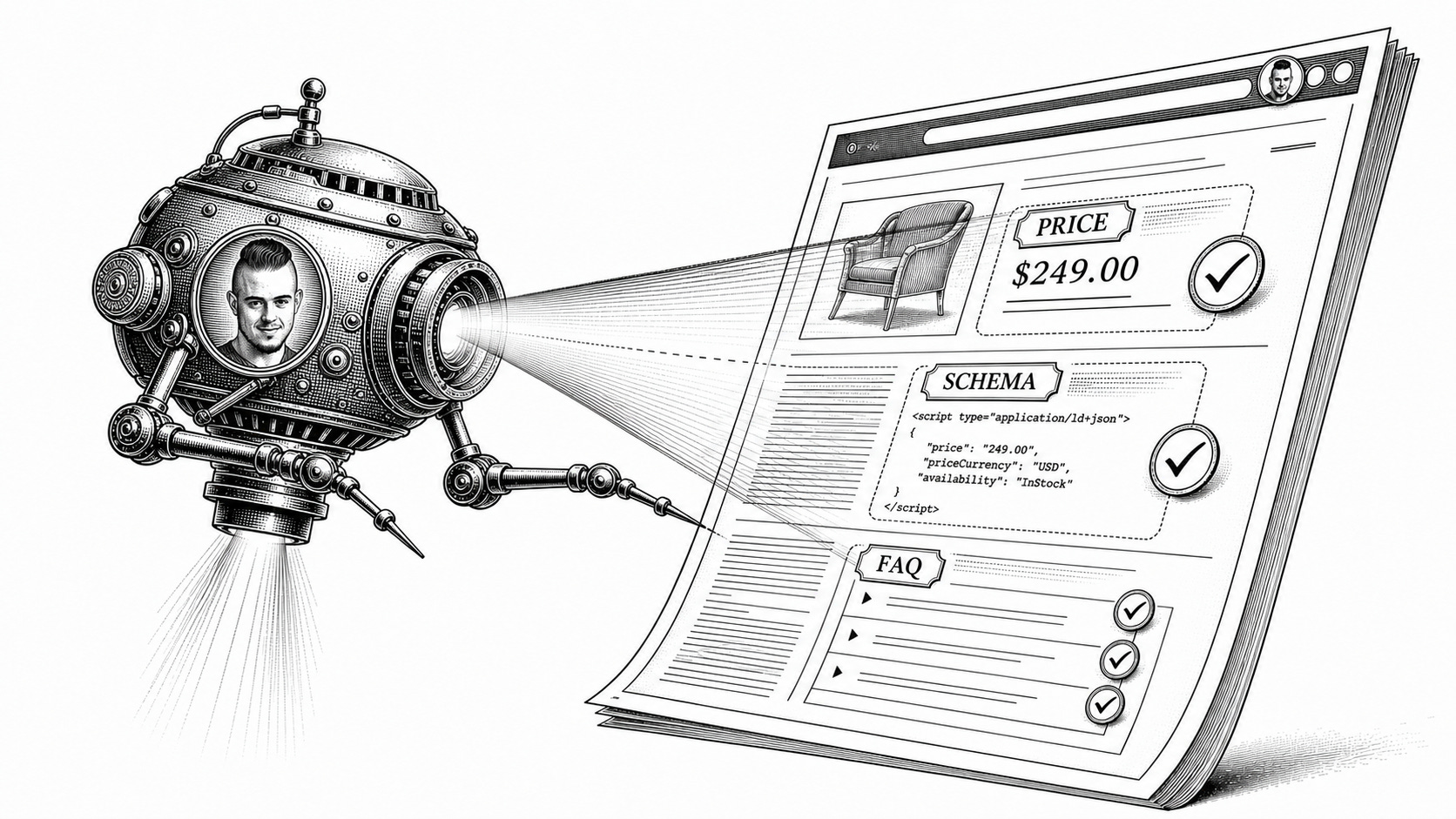
The next mass frontier of AI is agentic:
Google introduced agentic tasks in Search
Salesforce found 20% of sales coming from agents marks a signpost
60% of companies use agents live in production, and 3 out of 4 companies invest in AI agents
To figure out how ready B2B sites are for agentic visitors, I teamed up with David Kaufman, founder of Siteline, and I analyzed how agents scan websites and where they get stuck. The answer: most sites are agent-ready, but there is one critical breaking point.
Agents don’t read websites like humans. They receive a task, search the web, fetch pages, extract facts, and cite the sources they used. A page can persuade a human and still fail an agent if the facts are hard to find (opacity), hard to fetch (machine-readability), or hard to cite (access friction).
AI agents turn websites from showrooms into barcodes.
Methodology
How we looked at agent behavior:
The agent had to find the official site itself. We did not provide starting links, eg to homepages.
We gave agents 3 buyer-related tasks for 100 B2B products: find pricing/features, integrations, and security/compliance. We ran each task 5 times to measure the impact of the probabilistic nature of LLMs.
We weren’t comparing whether or not the information existed somewhere on the web; instead, we measured whether the agent could reliably answer from the vendor’s own site.


Everyone’s bracing for Google Zero. Cyrus Shepard studied 400+ sites and found the ones still growing share five specific traits.
Zero-click search is real. The “SEO is dead” takes are not the full story.
Cyrus mapped what’s actually driving organic growth right now, plus the 17 content types most likely to survive Google Zero. We’re hosting him for a practical session on what every content team is trying to decide: what to keep investing in, what to rethink, and where AI actually helps.
You’ll walk away with:
The five traits behind sites still growing in Google
Which content formats still earn their keep, and which are getting harder to justify
How to turn proprietary assets you already own into content
Where AI fits now: what to stop producing faster, what to build instead
Built for SEO and content leaders, content directors, and B2B growth teams.
July 23, 3pm ET. Live on Zoom, recording sent to everyone who registers.
Featuring Cyrus Shepard

1/ Pricing breaks first-party sites
The moment a prospect looks at pricing, they stop browsing and start comparing. #High buyer intent, bottom of the funnel. That makes pricing the hardest and most important test of whether a vendor site can serve agents directly.
Pricing also sits in a triangle of 3 “wants” that good pricing pages need to satisfy:
Companies want to control pricing disclosure.
Buyers want fast comparison.
Agents need clear, fetchable, citable facts.
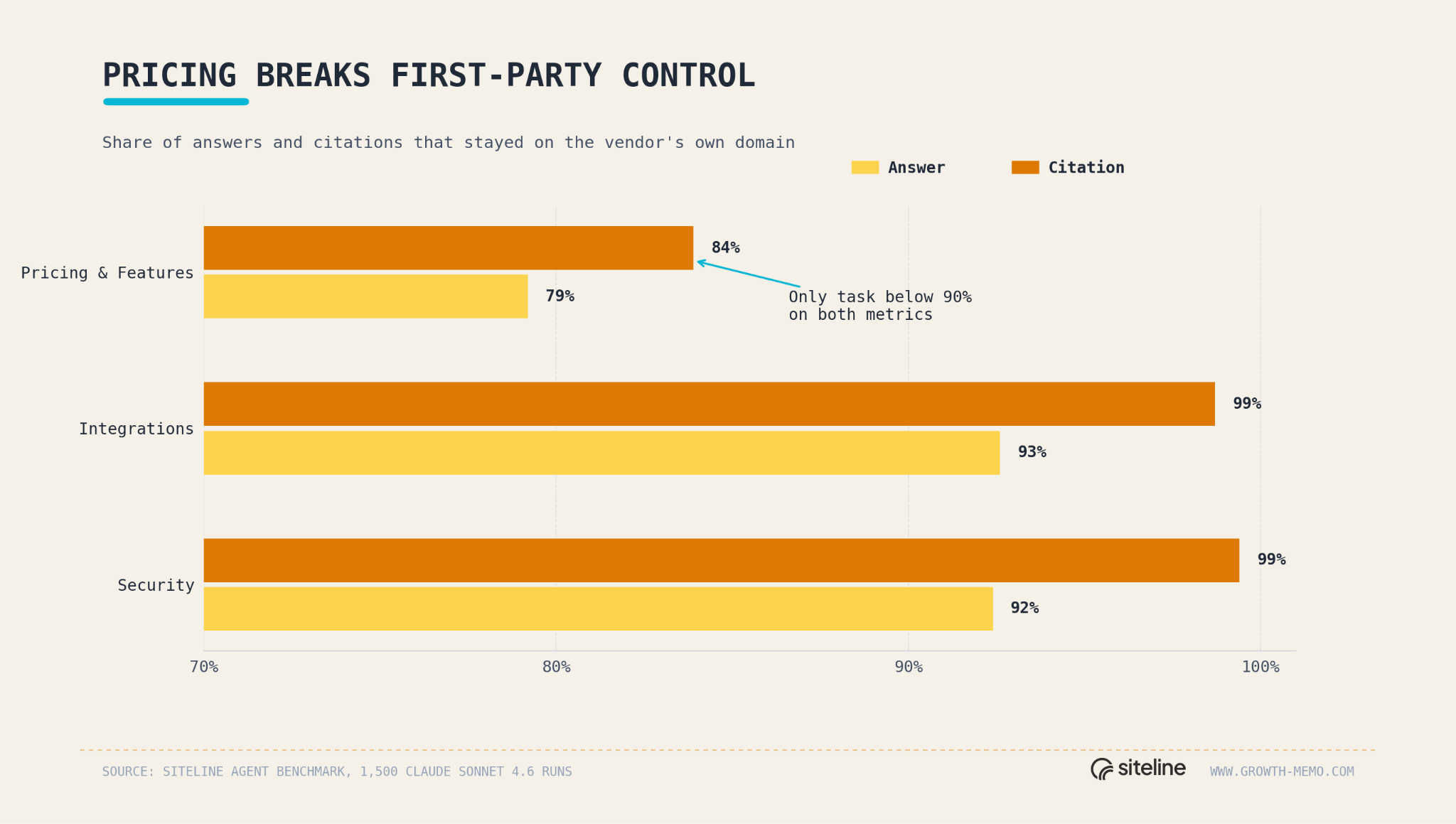
When AI agents try to retrieve pricing, they get stuck much more than for security or integrations.
Pricing/features: 79% first-party answer rate, 84% first-party citation share
Integrations: 93% and 99%
Security: 92% and 99%
Pricing/features produced 77% of all third-party citations
If you wonder whether that’s because some B2B companies don’t publicly show pricing, you’re only half right.
2/ Hidden pricing is only part of it
Hiding prices forces agents to look elsewhere, but published prices do not fully solve the problem. Among pricing prompt runs where the vendor did not disclose a real price, 45% cited at least one third-party source. The other 55% stayed on first-party citations, usually by saying the vendor required contact sales or did not publish a concrete price.
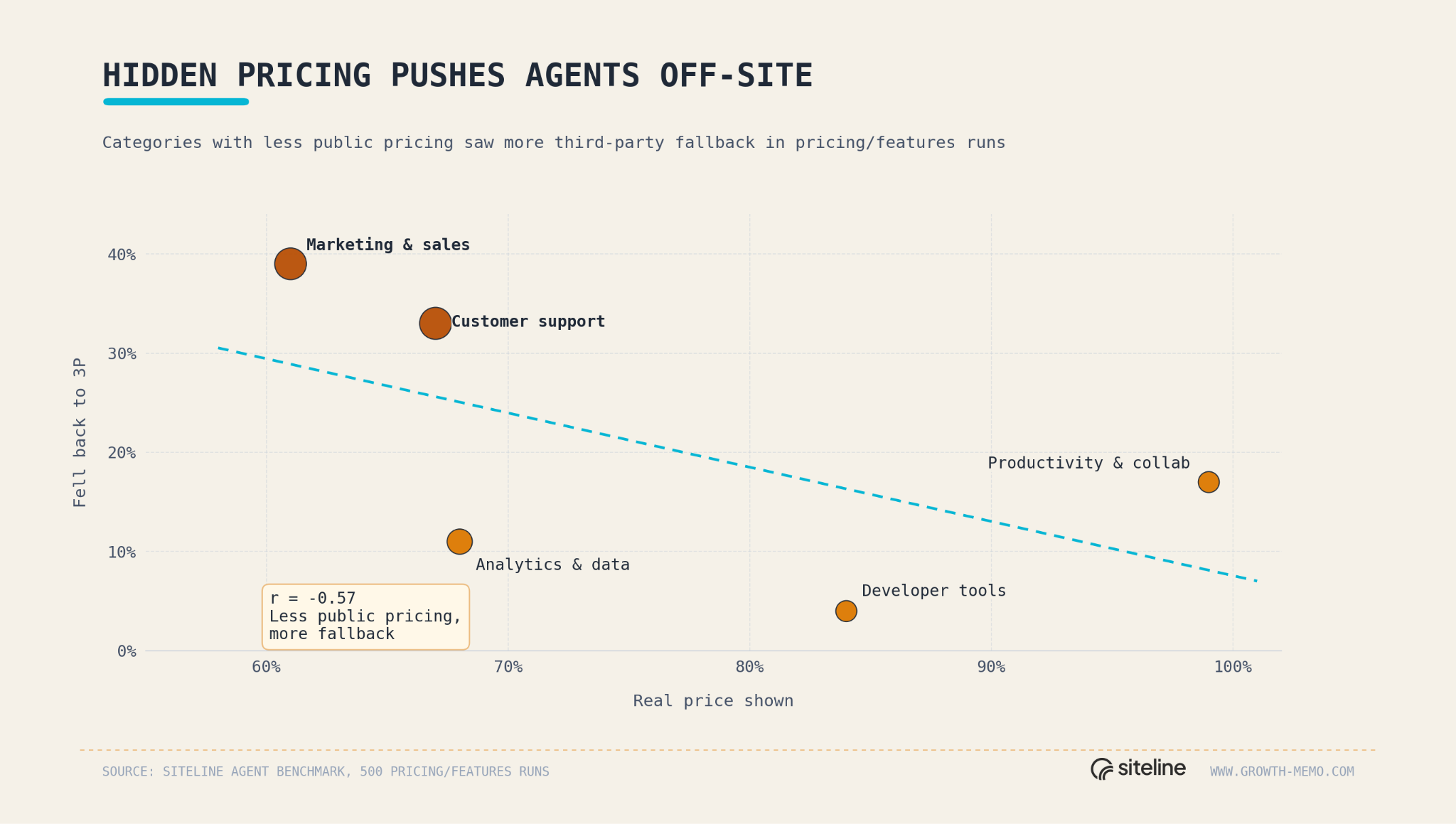
Even when the vendor showed a numeric public price, agents still cited at least one third-party source in 18% of runs, suggesting price can be on the page but still be hard for the agent to extract, trust, or cite cleanly.
You can try to hide your pricing, but you better make sure no one else knows and writes about it. Once it’s “out there”, it’s too late. If you have complex pricing methodology, the best way is to explain it clearly and make it accessible to agents.
Some pricing pages are visible to humans but not reliable enough for agents to parse and cite. You can’t always trust your eyes.
3/ Agents fail for 3 reasons
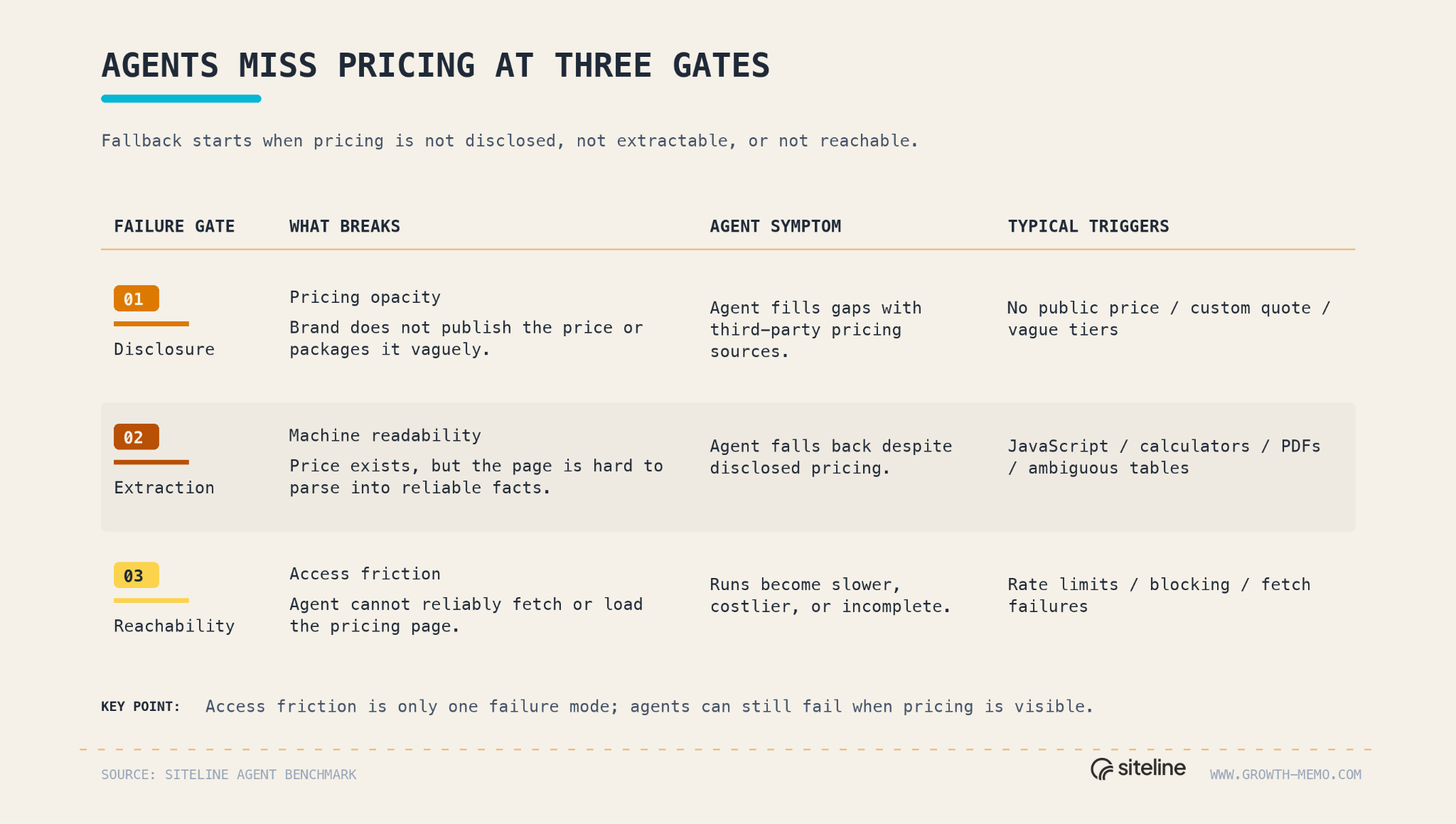
Agents fail to retrieve pricing from a brand for 3 reasons: opacity, machine-readability, and access friction.
Pricing opacity simply means the brand doesn’t publicly disclose the price, or it’s vaguely packaged. Opacity explains elevated fallback, meaning agents have to rely on 3rd parties for information.
Machine-readability describes the situation when prices exist, but agents still do not confidently extract them. Machine-readability explains fallback despite disclosed pricing. Machine-readability fails when the price is hard to extract because of page structure, JavaScript, calculators, toggles, screenshots, PDFs, or ambiguous tables.
Access friction is what most people expect to be the problem with agents. The agent hits fetch failures, rate limits, blocking, or unreachable pages, making agent runs more costly.
Access errors were not the main reason agents left first-party sources, but when they happened, they were severe. They appeared in only 7% of all runs. In pricing runs, access errors pushed third-party fallback to 77%, compared to 17% without access errors.
The impact of errors on agent run cost (tokens, web searches, fetches, retrieves, time) is significant when comparing the 90th with the 10th percentile in our study:
Cost: 4.4x
Token: 4.7x
Time: 2.0x
Brands don’t pay that bill directly, but it is a useful proxy for friction. The harder your site is to retrieve, the more work an agent has to do before it can answer from your page. If your pricing page is blocked, slow, hard to fetch, or hard to parse, the agent has two choices: spend more work on your site… or get the answer somewhere else.
4/ The fallback web is messy
Fallback is when agents have to rely on 3rd party sources as opposed to 1st party, as a result of the 3 failure modes. This is the biggest risk because 3rd party information is spotty, and it’s not in your control.
Agents do not fall back to one clean source category. They reconstruct pricing from a mixed web of explainers, directories, app stores, partner pages, and low-trust aggregators.
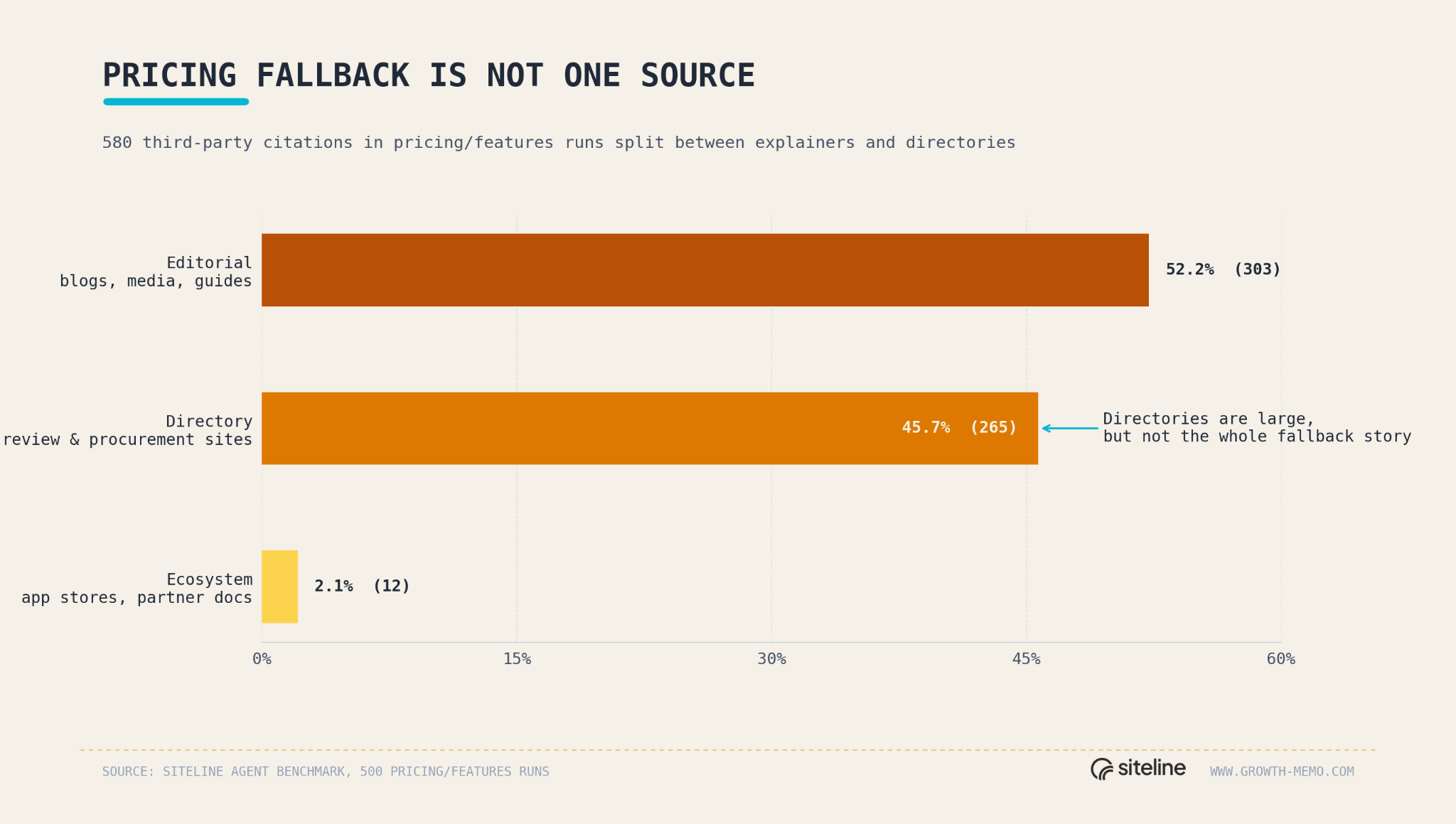
Key stats from the 580 pricing third-party citations:
52% were editorial (blogs, media articles, comparison guides, explainers, and other article-style pages)
46% fell into the directory category (review, procurement, and software-listing sites such as G2, Capterra, Vendr, Tekpon, and similar domains)
2% from broader ecosystem pages (app stores, marketplaces, partner pages, and integration directories tied to another platform)
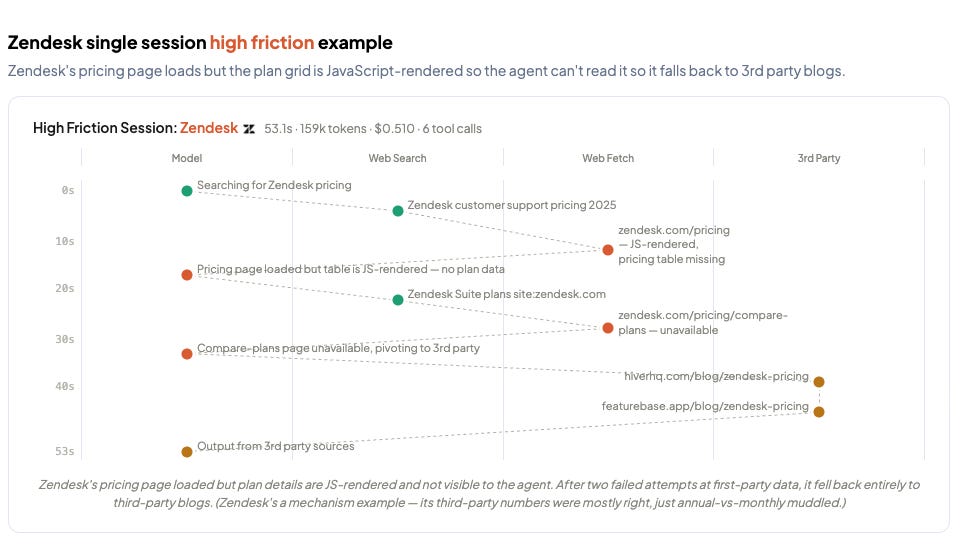
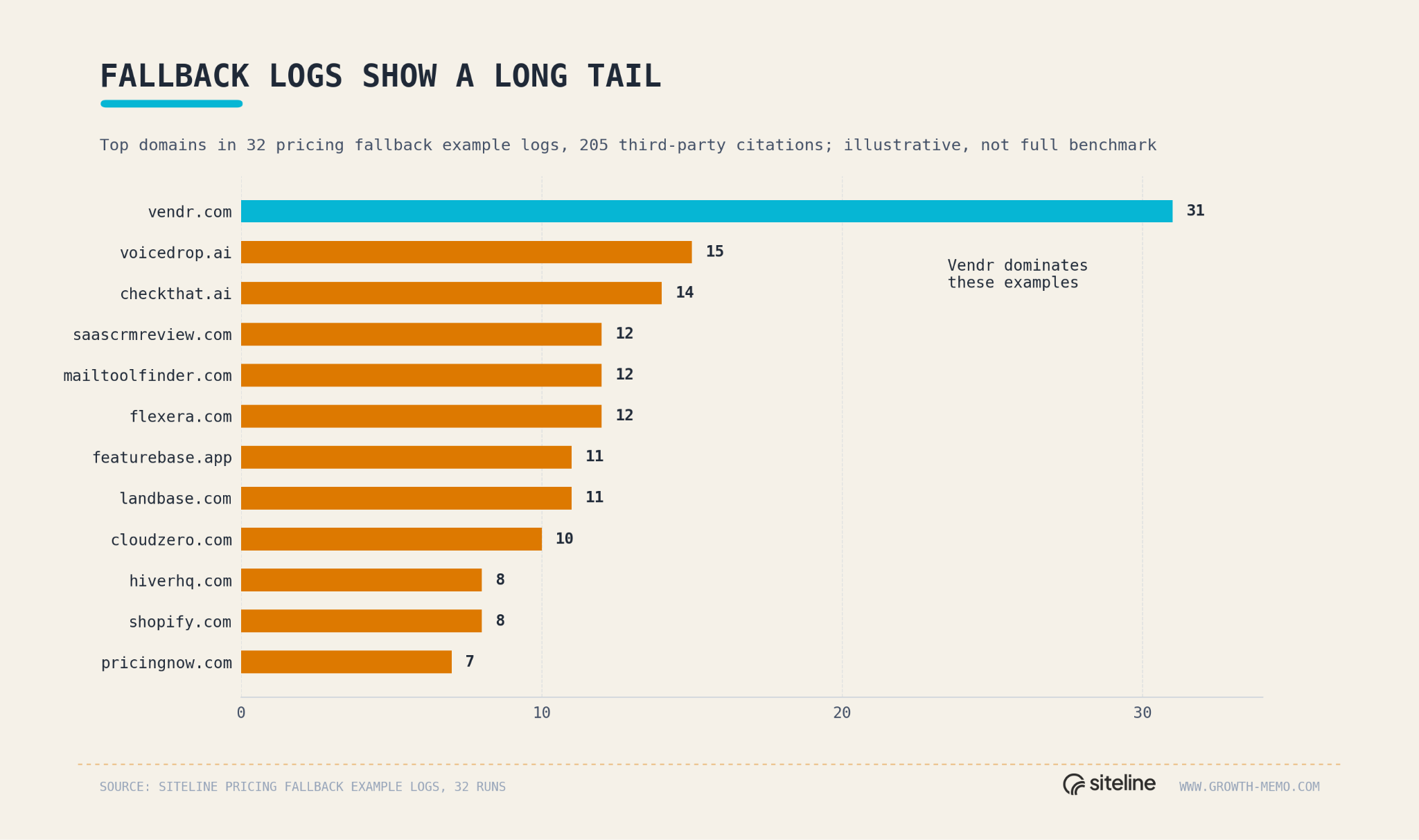
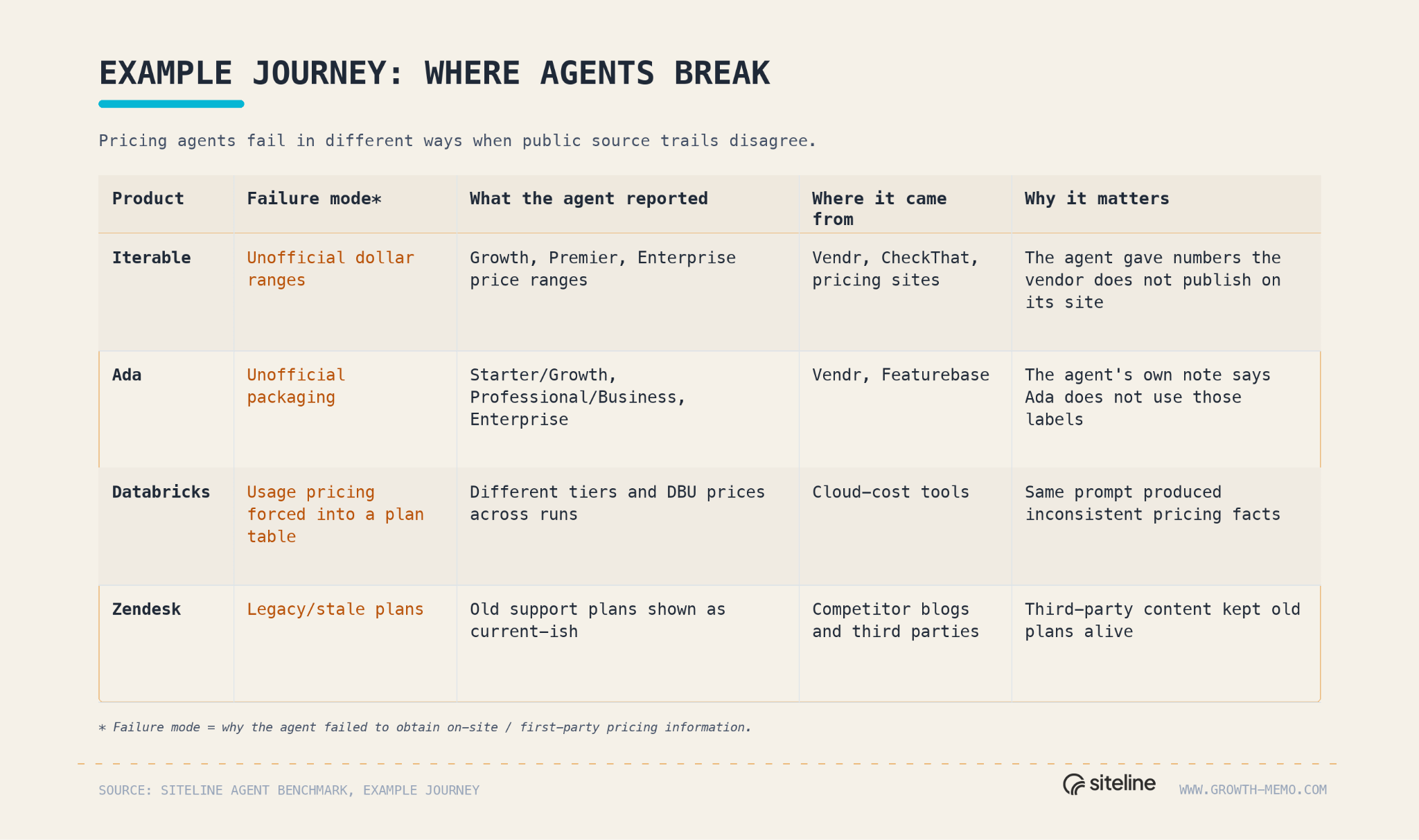
The examples show the risk of missing pricing transparency and agent stumbling blocks on your site.
Example journey:
5/ How to make your site agent-proof
An agent-proof pricing page is how you keep the agent quoting you instead of a directory like Vendr. The fixes map to the three failure modes.
Disclose the fact (opacity)
Publish real prices in text for every self-serve tier. If a tier is genuinely custom, say what drives the number instead of “contact sales.”
Keep plan names, prices, limits, and features on one canonical pricing URL, and point every other mention back to it.
Mark legacy plans clearly so third-party content can’t keep stale tiers alive.
Make the fact extractable (machine-readability)
Put prices in crawlable HTML. Many agent fetches never run JavaScript, so a price rendered client-side is invisible. In testing, prices in server HTML got read in under a second; a JavaScript-only price got missed.
Add schema.org Product and Offer markup with price and priceCurrency. This single lever moved a page from 73 to 93 in the readiness test.
Explain usage-based pricing in text, not a calculator-only widget.
Let the agent in (access friction)
Allow AI crawlers in robots.txt (GPTBot, ClaudeBot, PerplexityBot, Google-Extended). Check you aren’t allowing Googlebot while blocking them.
Don’t block server-side AI fetches on pricing pages. Access errors hit only 7% of runs, but they push fallback from 17% to 77% when they do.
Keep the price early in the DOM and the page light. A 1 MB pricing page taxes every agent and pushes cheap runs to route around you.
Fix opacity and machine-readability first; they drive most of the fallback. Then run the query yourself, “Find all pricing and features for [product].”,” and measure it with the skill below.
Premium: Check the agent-readiness of a page
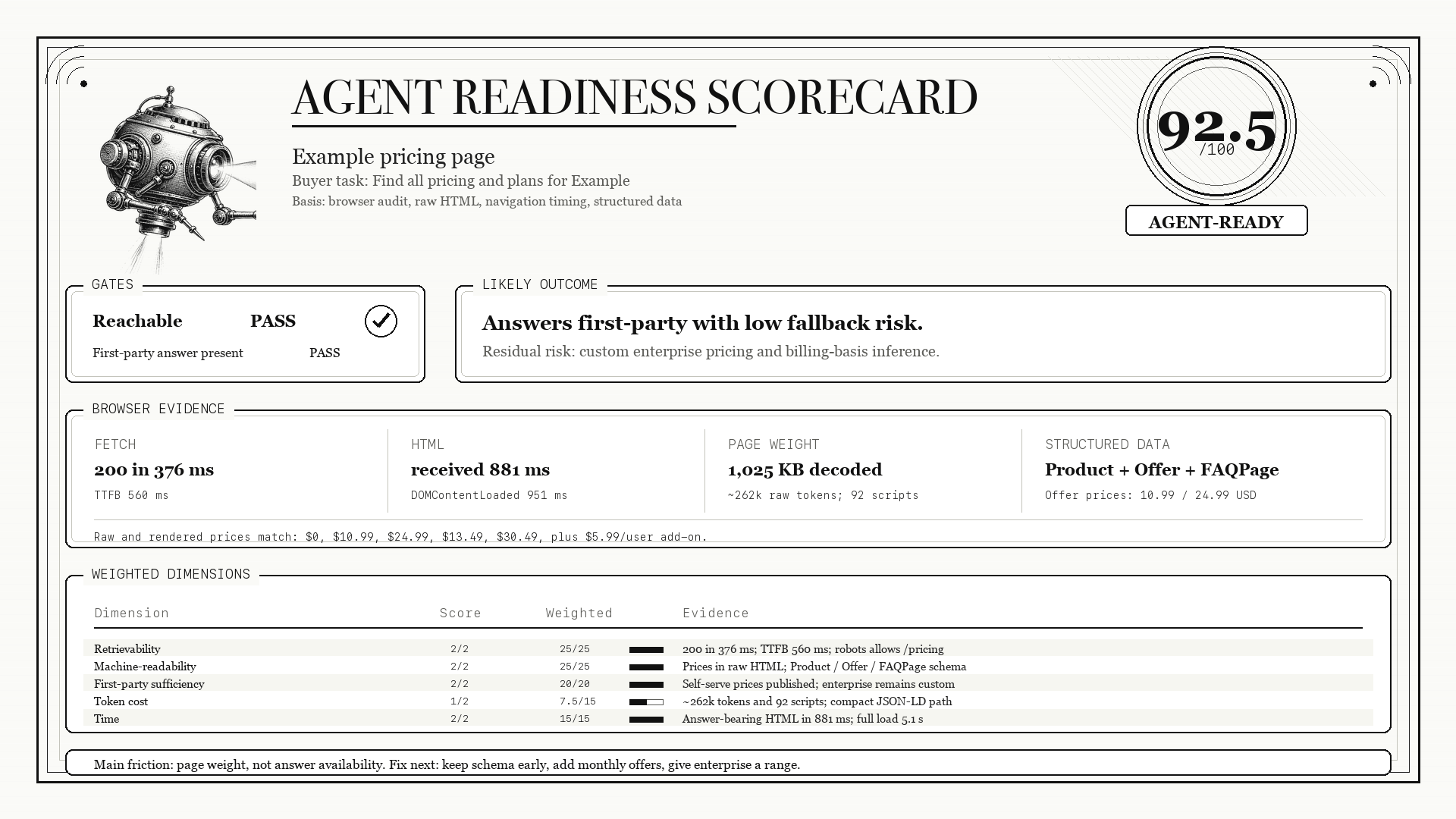
A well-known B2B SaaS pricing page scored 73 out of 100 the first time the skill ran, and 92.5 the second. Same page, same hour. The 20-point jump came entirely from how the page got fetched.
The skill simulates an agent answering a buyer question from one page: Fetch it, pull the fact, measure the cost across five weighted dimensions.
